How to use your Google Business Profile to get more customers
in the digital age Today, a strong presence on Google Maps has become essential for many businesses. It is a powerful platform that allows you to connect with potential customers in your area, increase brand awareness and encourage engagement.
In this extended article, we will dive deep into the world of Google Maps advertising and learn how you can effectively utilize this platform to achieve your business goals with it.
What is Google Maps advertising?
Advertising on Google Maps allows you to display your business Yours in Google search results and maps when people search for businesses like yours in your area. These ads appear alongside the organic search results, allowing you to stand out from the competition and attract more attention.
Forget cost per click (PPC) and an advertising budget funded in thousands of shekels per month - free organic clicks!
Google is the most popular website in the world. The site currently holds more than 90% of the search engine market share. Creating a Google Business Profile (formerly known as Google My Business) is an important way to attract new customers to your business in Google search results and Maps.
Google's changes - at the beginning, Google My Business becomes the 'business profile on Google', as part of an effort to unify their services for business owners. In addition, Google is moving the GMB app from the app store and now you can edit the business profile directly from Google.
What is the business profile on Google (Google Maps)?
Your business profile on Google, also known as "Google My Business", "Google Maps", "Google My Business" and more, is a free tool that allows you to display your business in Google search results and Google Maps.
This is a free business profile from Google that allows you to provide details and information about the business, including photos, location, services, promotions and products the business offers.
creation A Google profile is a great way to increase the visibility of your business in all Google services and attract new customers to the business.
Advantages of advertising on Google Maps
- Reaching a relevant audience: Your business profile will appear in Google search results and maps when people search for businesses like yours in your area.
- Improving brand awareness: Displaying your business in search results and maps will help you increase brand awareness and improve your recognition among your target audience.
- Encouraging involvement: Your business profile allows you to include important information about your business, such as address, opening hours, phone number and more. This information can help you encourage potential customers to visit your website, make a call or physically visit the business.
- Getting performance data: Google provides you with basic statistical insights on the performance of your business profile, such as the number of views, the number of clicks and the number of actions performed (such as making a call or visiting a website).
How to create a business profile on Google (briefly)
- Create a Google Account: If you don't have a Google Account, you'll need to create one before you begin.
- Go to Google My Business: (follow the instructions).
- Enter your business name: Make sure the name of your business matches the name in which it appears in the real world.
- Choose your business category: Choose the category that best suits your type of business.
- Enter your contact information: Make sure your contact information is up-to-date and accurate.
- Confirm your location: Google will verify your location using Google Maps or by sending a postcard with a verification code.
- Add photos and videos: high-quality photos and videos can help you attract attention and make your business profile more attractive.
- Save the changes: Once you have entered all the required information, save the changes and your profile will be active.
Why do you need a business profile on Google?
Discover on Google and Google Maps! the key to success Business Whether you are looking for customers who will physically come to the business or you are a business that provides a service, Google is the key to business success!
With a Google Business Profile, you ensure that people find you easily and quickly when they search for products and services like yours in your area.
A well-managed business profile:
- Show up in search results and Google Maps, and you'll always be there for potential customers.
- Displays all important information about the business, including address, opening hours, phone number, photos, and more.
- Allows customers to contact easily through a phone call, message or website visit.
Effective management of a Google business profile will bring you:
- Significant improvement in local SEO - your business will appear at the top of the search results when people are looking for nearby businesses in your area.
- Reaching a wider audience - Google Maps is one of the most popular applications in the world, and will expose you to a huge audience of potential customers.
- Encouraging engagement - you will get statistical insights on the performance of your profile and you can see how many people found you, called you or visited your website.
Strengthening customer trust - an updated and professional business profile creates a positive first impression and makes potential customers trust you more.
A small investment of time and effort can yield huge results for your business. Create a Google business profile today and start enjoying the many benefits it offers!
Regular and accurate management and updating of business data
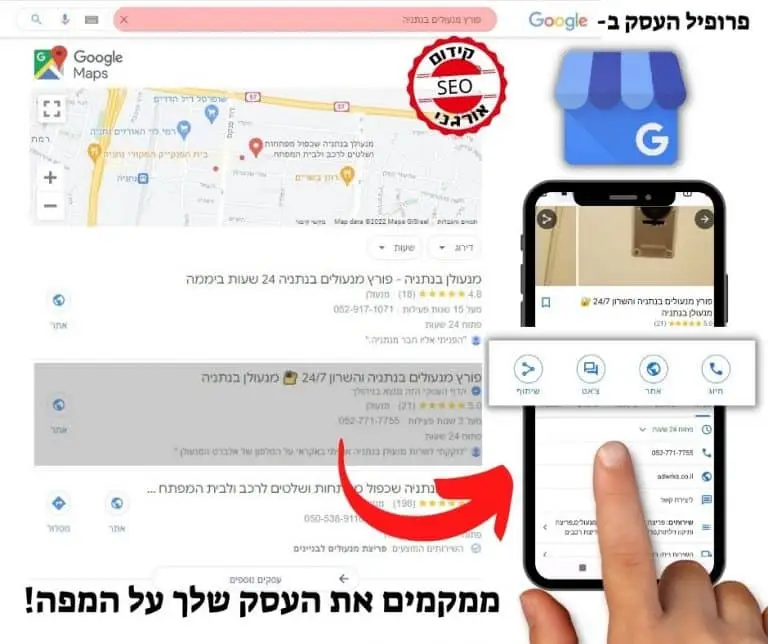
The business profile on Google allows you to control and update the contact information, hours of operation and other essential details as needed.
Ensure that your customers will always find you: keep your business data updated and accurate on Google.
Google Promoted Business Profiles have strong local promotion, so the information you share will rank above competitor sites that may contain out-of-date details.
Reviews: a showcase for your business
Reviews are a powerful tool Building trust and a positive reputation for your business. They allow existing and potential customers to get an impression of your experience, get authentic information about your products or services, and hear other people's opinions.
Google's integrated star rating and open review platform allow customers to share their opinions freely. They can write a detailed review, describe their experience, and even rate you.
This information is essential for potential customers, as it helps them decide which businesses to choose and which products to buy. Positive reviews can strengthen the trust of potential customers and encourage them to purchase, while negative reviews can be a warning sign and make them think again.
It is true that negative reviews can be hard to digest, especially when they are presented on a public platform. It's important to remember that business owners can't choose which reviews to display, but they can respond to any of them.
The important thing is not to be intimidated by negative reviews. In fact, a combination of positive and negative reviews creates a more genuine image of your business, and makes potential customers trust you more than a profile with only glowing testimonials.
Here are some tips for dealing with negative reviews:
- Respond professionally and politely. Thank the customer for their feedback, apologize if a mistake was made, and explain how you plan to correct the situation.
- Use negative reviews as an opportunity to learn and improve your business. Take the review seriously and look at how you can improve the experience of your customers.
- Don't ignore negative reviews. Addressing them correctly will show potential customers that you care about them and that you are willing to improve your service.
Remember, reviews are a powerful tool that can help you build a successful business. Use them wisely, and you can create a positive reputation and attract new customers.
Google Business Verification
Why verify?
- To update the name and other details of the business on Google.
- To make sure that only you can edit the information.
- To protect the business from impersonation and misinformation.
How to verify?
- Add a new business profile or claim ownership of an existing one.
- Choose a verification method: phone, SMS, email, video or sending mail.
- Pass the verification process successfully.
Tips:
- Make sure your address meets Google's guidelines.
- You may need to authenticate using more than one method.
- The test may take up to 7 business days.
- After verification, it may take a few weeks to update the business details.
- For more details, visit the Google for Business community or contact support.
Remember: business verification is important for protecting your information and your reputation.
Some businesses go through the verification process of the business profile very quickly and for some it is much more difficult and even sometimes without success at all.
How to set up the business profile on Google (in detail)
Step 1: To get started, you need to log inGoogle's business profile management tool
- If you are already signed in to a Google account, you will be signed in automatically.
- If not, you'll need to enter your regular Google Account login information or create a new Google Account.
Step 2: Adding the business
- Enter the name of the business. If it does not appear in the drop-down menu, you can click on "Add your business to Google".
- Then, choose the appropriate category for your business and click "Next".
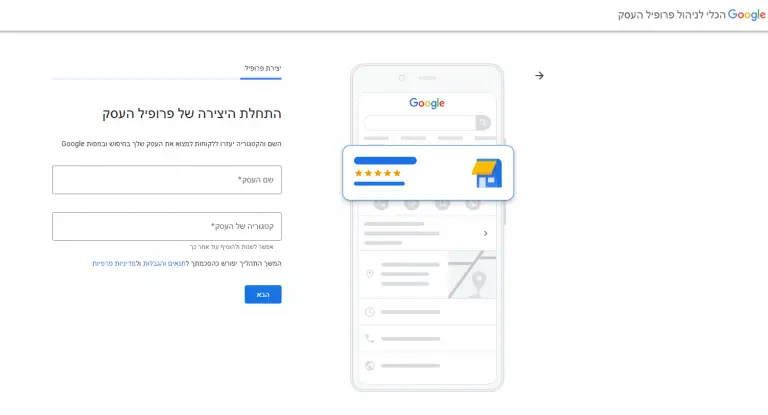
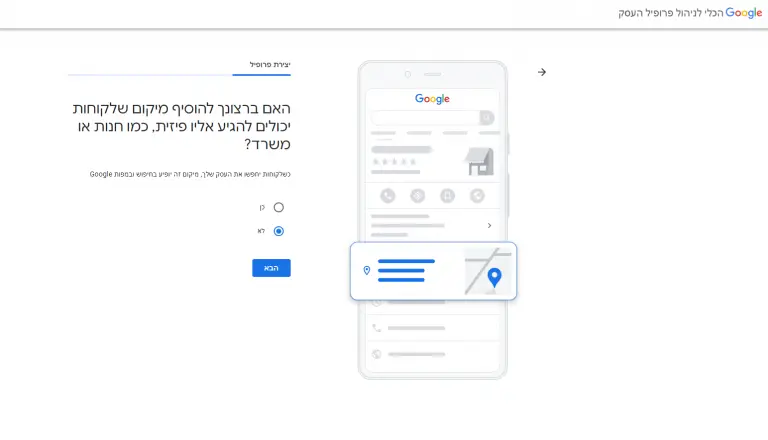
Step 3: Adding the location of the business
- Do you have a physical location?
Yes: Enter your exact address. You may also be asked to mark the location on the map.
No: go to the next step. - Do you offer services in a certain area or a delivery service?
Yes: Specify your service areas. You can also choose the option "all the country".
No: go to the next step.
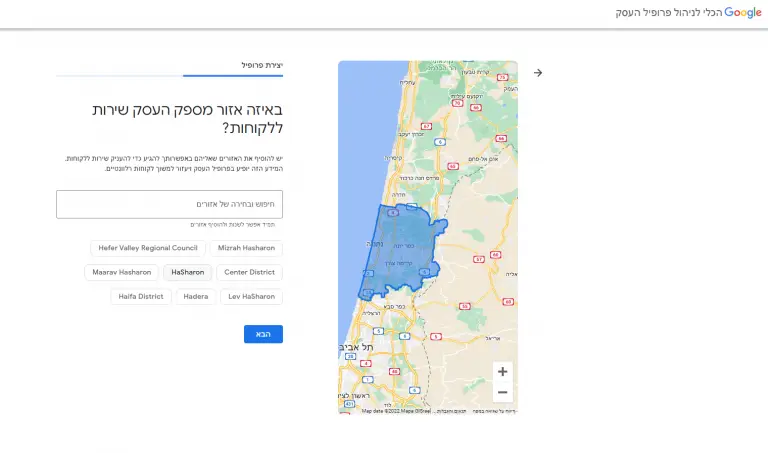
If you have not entered a physical address, Google will ask you to indicate in which area your business provides service.
You can search and choose from the proposed menu and then click on the "Next" option.
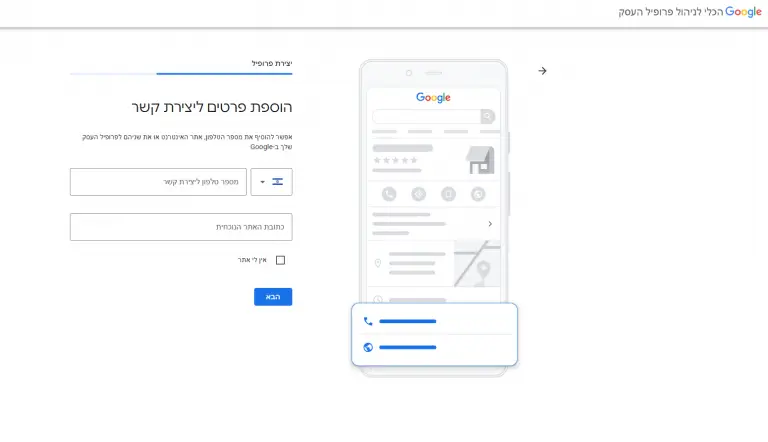
Step 4: Add contact details
Enter the phone number and website address of the business. If you prefer not to be contacted by phone, you can only add the website and vice versa.
After that, click "Next".
Step 5: Verifying the business
Please enter the exact location address and not a PO Box. This information will be used for verification purposes only and will not be displayed on the business profile on Google or shared with the public.
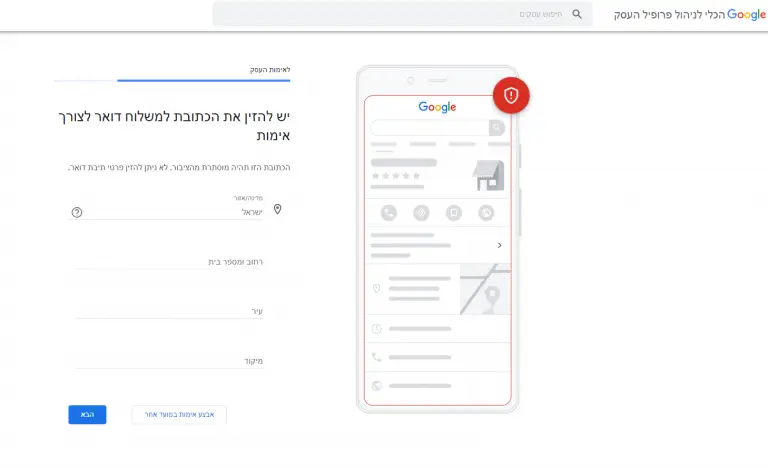
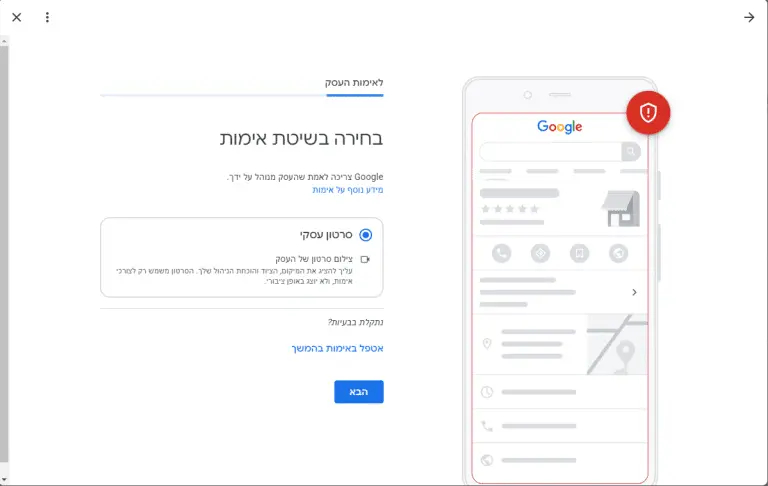
When you enter the address and click "Next", you will be presented with the relevant options for verifying the profile (you can skip the process and perform verification at a later time). The verification method as already stated: phone, SMS, email, video or sending mail, where recently most verifications are done through a video showing the business. You need to present your location, equipment and proof of management in a business video. The video is for verification purposes only and will not be broadcast publicly. After receiving the fifth code, you must enter it in the Google business profile management tool.
Step 6: Make your profile unique!
Present what you have to offer:
- Services: Choose from an existing list of services offered by Google, or create personalized services unique to your business.
- Hours of Operation: Make sure customers know when you're open! We have updated your operating hours, including specific days, shifts and even a 24/7 option.
- Messages: Allow customers to communicate with you easily! Activate the option to send messages, and you can receive and respond to messages directly through your profile.
- Description: Tell customers more about your business! Add a detailed description that will include relevant information, and you can appear in search results, maps and other Google services.
- Photos: A picture is worth a thousand words! Add high-quality photos of your products, services and business, and give customers an enticing glimpse.
Start posting on the same day!
With Google Ads, you can easily create sponsored advertising campaigns in a few minutes, and reach a wider customer base.
All details will appear to customers on Google after the business is approved, and you can continue to update the business profile at any stage.
When all the details are entered, you can click "Continue", and you will appear in the control panel of the Google Business Profile Management Tool.
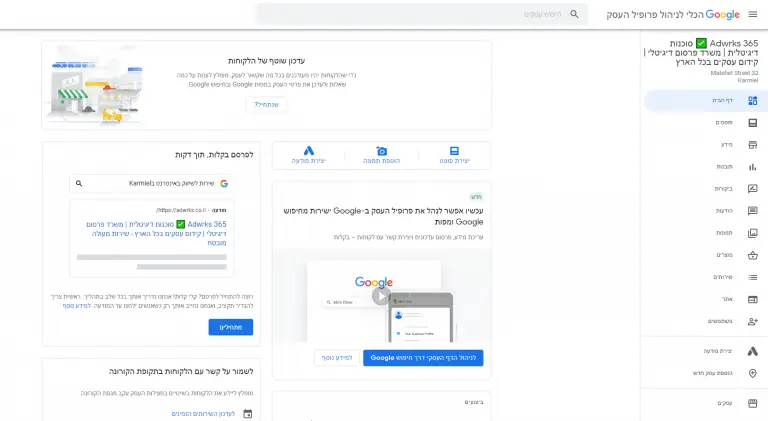
From the control panel you can manage the business profile, update information, display insights, manage reviews and messages and create Google ads.
Want to appear at the top of the Google Maps search results? We are here to help!
Call now or fill out a quick contact form
How to optimize the business profile
Google determines the local search ranking based on three factors
relevance: The level of suitability of your business profile for Google search.
distance: The distance between the location of the business from the search or from the searcher.
prominence: How well your business stands out compared to the competition, based on links, amount of reviews, review rating and organic promotion (SEO).
Below are some basic steps to improve the search ranking in relation to the three factors.
1. Completion and updating of all information in the business profile
Fill out your business profile on Google and enjoy tremendous benefits:
- Reputation: customers will see you as a professional and reliable business owner (2.5 times higher chance!).
- Interaction: more customers will make contact - call, message or visit (70% more!).
- Relevance: A complete profile will promote you in the search results.
Filling out your business profile on Google is a simple and quick step that can have a significant impact on your success. A complete and updated profile gives customers all the information they need to find you, build trust and increase sales.
Add relevant information, keep it updated, use quality images, allow customers to contact you and track performance.
With a complete profile, you will gain more exposure, trust, customer satisfaction and sales. Don't hesitate! Fill out your profile today and start enjoying the benefits!
2. Distance and business verification
An unverified business profile will not be eligible to appear in local search results on Google products, such as Maps and Search.
Adding a verified physical location helps improve a business's score for the distance rating factor.
- Enter your business address accurately.
- Make sure your location on Google Maps is up to date.
- Use geographic keywords in your content (for example: service provider in Haifa).
If you skipped location verification during the account creation steps, verify the business in one of the ways detailed in step 5.
3. Adding photos, videos and content regularly
The business profile on Google includes a logo, cover photo, atmosphere photos, staff, videos and more.
It is important to use appropriate images for your social profiles to easily identify your brand.
It's important to update photos and videos frequently to properly showcase the location, work environment and staff.
For example, in the case of a restaurant, it is important to post photos of the dishes, menus and atmosphere, and make sure they are appetizing, professional and not low resolution.
Businesses with quality images and content get more calls and clicks to their websites.
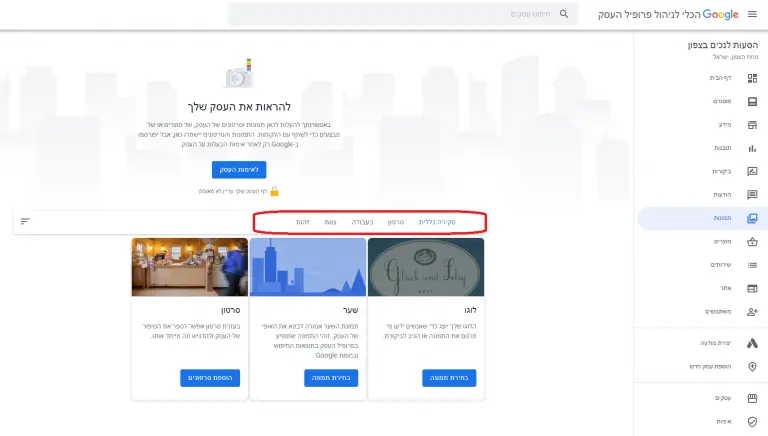
To add or edit photos on your Google business profile:
- In the control panel, click on "Images" in the right menu.
- Start with the logo and the cover photo, then you can upload a photo, choose one of the business profile folders or choose a photo in which the business will be tagged.
- To add more photos, click on "at work" or "team" in the top menu of the photos page.
- To add videos, click on the "Video" tab at the top of the photos page.
4. Including keywords in the business profile
Using the right marketing keywords to improve relevance by using keyword analysis and planning tools.
It is important to integrate them in a natural and marketing way in all the content and advertisements that are uploaded to the business profile.
Incorrect and irrelevant keywords can harm your business's search results ranking.
5. Answer customer reviews and questions
People trust other people more than they trust the business owners themselves.
Positive reviews can be the significant factor that brings potential customers to you, and also improve your ranking on Google.
The best time to ask for a review is after a positive experience has ended.
To make the process easier, Google offers a direct link to request the sharing of reviews from your customers.
To share with your customers the link to the review request for your business:
• On the business profile dashboard, scroll down to find the button that says "Share Review Form".

Copy and paste the link in the message to customers, or in the feedback and the automatic receipts that are sent after receiving a product/service.
Reviews cannot be turned off for your business profile on Google, as reviews build credibility with customers.
The only way to deal with inappropriate reviews is to report them when they are ignored.
Therefore, it is highly recommended to respond to all reviews, both positive and negative.
According to surveys, businesses that respond to reviews are considered 1.7 times more trustworthy than those that do not.
You should respond to reviews in a courteous and professional manner, and in the case of a negative review, it is important to apologize fairly and when necessary.
You can also respond to reviews through your profile's admin panel, by clicking on the "Reviews" tab in the right menu.
6. Keep an updated business profile on Google
When customers search for something on Google, they expect to find reliable and up-to-date information.
- We updated information: business hours, address, phone, website and more, every time something changes.
- Don't let them arrive and find that the business is closed: make sure that special opening hours for holidays or events appear on the profile.
- Share news: We updated existing customers and attracted new ones with posts about promotions, events, new products and more.
- Listen to them: respond to customer reviews and comments.
Why is this important?
Satisfied customers: accurate information prevents disappointments and contributes to a positive customer experience.
Good reputation: negative reviews due to outdated information damage the reputation.
More customers: A high ranking in the search results attracts new customers.
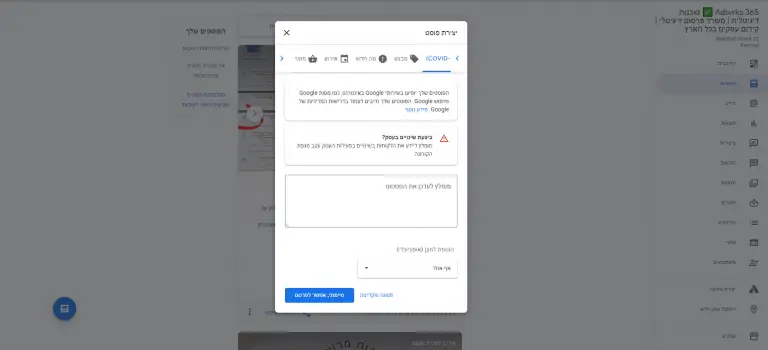
Create and share Google Business Profile posts:
- Go to the dashboard and click on the Posts tab in the right menu.
- Select the "Create Post" option.
- You can choose the type of post you want to create: update, sale, news, event or product.
- Each post type has a requirement to complete different information.
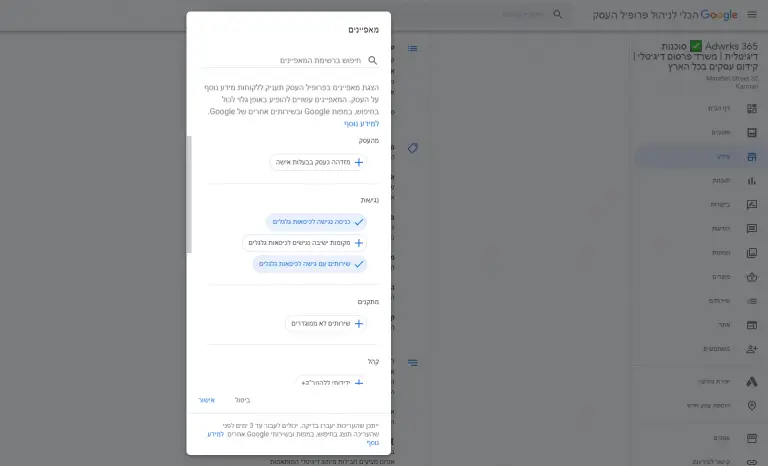
7. Add special features and features
Special features are available for Google Business Accounts, depending on the category selected.
Examples of specific features by category:
- Hotels: ratings, procedures, check-in and check-out times, and facilities.
- Restaurants and bars: menus, photos of popular dishes and more.
- Service-oriented businesses: list of services.
Businesses can access different types of buttons depending on their category, such as appointment booking and online booking.
It is important to choose the correct category to display the appropriate features. (You can choose up to 10 categories for the business).
You can also add additional features that may be of interest to your customers, such as wheelchair accessibility, free Wi-Fi and outdoor seating.
You can also indicate if your business is owned by women and is LGBT friendly.
To add or edit properties
In the control center, click on information, select the business, and click on "Add Properties".
Scroll through all the available options for your business, check the relevant features and click "OK".
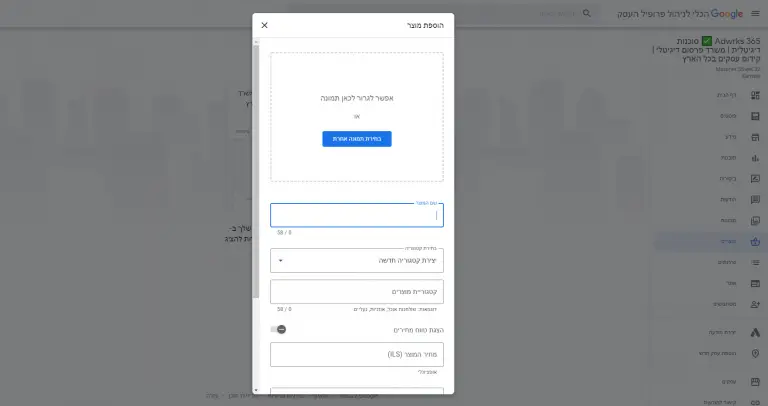
8. Add products
If you sell products, it's important to keep your inventory updated on your Google business profile.
In addition to appearing on the business profile itself, your products may appear on Google Shopping.
To add products to the business profile manually:
- Click on "Manage"
- In the right menu, select "Products"
- Then, click "Start" to add the product.
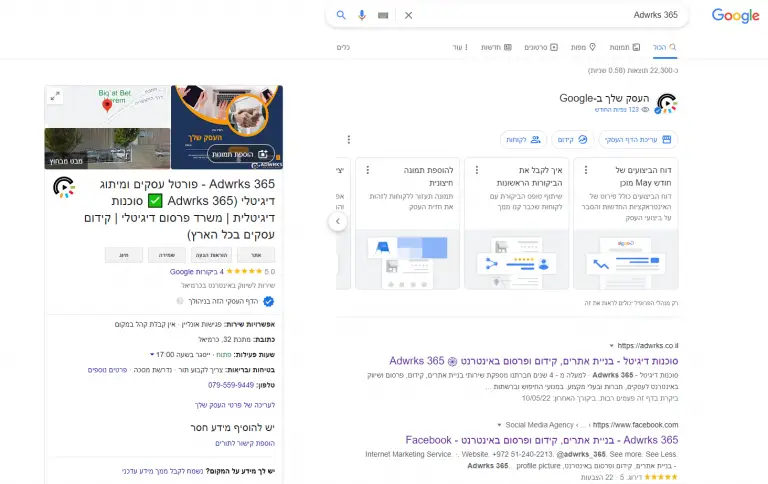
Managing the business profile on Google with Adwrks 365
We will manage your business profile on Google as a social platform, so that your business information and messages are always consistent, personalized and up-to-date.
With our team, you can focus on the important issues in managing the business itself and be relaxed.
We'll make sure to get you up in the search results on Google and on maps, so that you'll be ahead of the competition and receive more inquiries from new customers and keep the existing ones.
Options offered as part of the Google Business Profile management service:
- Opening a new profile or upgrading an existing one
- Verification with Google
- Frequent updates
- Response to messages and reviews
- Regular maintenance of the page
- Creating and uploading posts
- Upload photos and products
- Optimization according to Google insights and statistical reports
- Organic promotion of the business profile
- An opportunity to manage sponsored promotion in Google search and maps (including a 1500 NIS gift voucher for an advertising budget)
The service with us is not binding for a period of time, since we believe that satisfied customers stay 🙂
Read about us in the recommendations and let's start the partnership.
Are you ready to receive more inquiries for your business? Contact us.
Customers recommend





Ways to get in touch
We are here for any question, in the most convenient way for you
Search terms that people search on Google about Google Maps
Google for my business Google My Business | Google business page The business profile on Google Business profile on Google Google My Profile | Promoting the business on Google Business promotion on Google Advertising a business on Google Google Business Index | Promotion of Google Maps | Google Maps profile | Google Maps for my business Free Google Site | Free business page | Free website | Free Business Profile | Google My Business | Managing a business profile on GOOGLE Free Business Profile | GMB | google my business | Google Business Profile, a free tool for business promotion Appear on Google Maps | Appear in Google Search | Free Google promotion Free promotion on Google Appear in Google search results
Frequently asked questions
Is a Google Business Profile the same as Google Maps advertising?
What should we complete first in a business profile?
Verification, accurate name, address, phone, categories, opening hours, and real photos. A complete, consistent profile is the base for everything else.
How do reviews affect a map listing?
Reviews influence customer trust and are one of several local signals. Ask real customers for feedback and respond politely to criticism; never buy or fake reviews.
Can we guarantee a top position on Google Maps?
No. Local results depend on proximity, relevance, and prominence, among other factors. You can improve your profile steadily but cannot guarantee a ranking.