

In the digital world of 2026, speed is no longer a "bonus" - it is a condition of survival. If in the past we were talking about seconds, today we are talking about milliseconds. Google, through its advanced AI models, is no longer just scanning keywords; It "experiences" your website in real time. A slow site is a site that Google will simply stop displaying, therefore Improving site speed It has become the most critical element in your digital strategy - without it, the website simply hurts the user experience that Google is trying to provide and is pushed back.
It is important to understand: speed is not only a matter of organic promotion (SEO). Recently we are encountering more and more cases of them Google Ads Automatically disqualifies ads due to long load times. We have encountered clients whose campaign simply stopped because Google marked the link as "Destination Not Working". From the point of view of the system, if the site does not load within a few seconds, it is simply considered a broken site. The meaning? The business loses exposure, inquiries and money - just because of a slow infrastructure.
In this guide, we're on a team Adwrks We will dive into the technical and strategic depth of performance optimization. It's not just about installing one or another plugin, but a deep understanding of how browsers, sponsored campaigns and AI scanners work today.
Why is site speed critical to SEO and AI crawlability?

Google has moved to full use ofSGE (Search Generative Experience). This means that artificial intelligence doesn't just "scan" your website, it analyzes it in real time to provide direct answers to users. If your site is heavy or loaded with unnecessary code, the AI bots "get tired". In the professional language it is called Crawl Budget (Crawling budget) – Google has a limited amount of resources to devote to crawling. so, Improving site speed It is no longer just a matter of convenience, but a technical necessity: if the site is slow, the bot will scan only a small part of the pages, and your important information will simply not reach the AI's answer engine.
The Core Web Vitals in 2026: The metrics that determine your ranking
In 2026, Google is no longer looking only at "when the site was up", but at how it feels. When approaching the process of Improving site speed, these are the three indicators that must be in the center (and are especially critical for WordPress and Elementor sites):
- LCP (Largest Contentful Paint): The index that checks when the main content (like the hero image or the title) is shown to the surfer. In 2026, the target is under 1.2 seconds. Any deviation from this signals to Google that your site is "not ready for work".
- INP (Interaction to Next Paint): This is the index that finally replaced the old FID. It checks the site's dynamism: when a surfer presses a button or opens a menu, how long does the site take to respond? A "frozen" site where the surfer clicks and waits, will suffer a dramatic drop in ratings.
- CLS (Cumulative Layout Shift): You know when you press a button and suddenly the whole page "pops up" because an advertisement or image has been loaded? This is the CLS. Google is very strict with sites that pop up, because it is seen as a poor user experience and even misleading.
The technical infrastructure: why is your storage the real bottleneck?

Optimizing a website can be compared to improving a racing car: you can change to expensive tires and improve the aerodynamics (plugins and code), but if the engine (server) is weak and old - you will never win the race. In 2026, Google measures theTTFB (Time to First Byte) – The time it takes for your server to even start responding. If your server responds slowly, all other optimizations you make will be meaningless.
Our technology choice: VPS server from uPress
As someone who manages dozens of websites, we do not compromise on storage quality. on-Adwrks, we use the infrastructure of uPress, and specifically on my server VPS (virtual private server) customized to our needs.
Unlike regular shared hosting where you "share" resources with hundreds of other sites (causing sudden slowdowns), the uPress VPS server gives us processing power and memory dedicated solely to our site. This allows us to serve the site at maximum speed even under a load of surfers or intensive bot scans.
What makes storage "2026 ready"?
- Moving to NVMe technology: If your hosting company is still using regular SSD drives, your site is living in the past. NVMe drives are several times faster and allow the WordPress database to retrieve information in a fraction of a second.
- HTTP/3 protocol (QUIC): This is the new generation of network data transfer. It allows the browser to download all website components (images, code, text) simultaneously and securely. This is standard on the servers we manage.
- Latest PHP version: WordPress ran on the PHP language. Each version update (such as the move to 8.2 and above) brings tens of percent speed improvements in the server's memory management.
The DNS: the fastest path to your website
A common mistake is to use the domain registrar's default DNS servers. on-Adwrks, we combine the power of uPress servers together with Cloudflare. why? Because the DNS is the "phone book" of the Internet. The faster the browser finds your server address, the sooner the loading will start. This is a "free" improvement that can save hundreds of critical milliseconds before the first code is even loaded.
Expert tip: Cheap storage at $5 a month is often the most expensive expense of your business. It costs you in Google placements, sponsored ad rejections and customers who leave the site out of frustration. Investing in a quality server is the investment with the highest ROI you can make for the website.
Optimization of assets: how to handle images and video without damaging the design?

In ranking the slowness factors of WordPress sites, the weight of the media is almost always in first place. Over 70% of average page weight comes from unoptimized images. In 2026, uploading a JPEG image directly from your camera or stock is simply a "crime" against your SEO. Google and its AI crawlers are looking for lightweight websites, and heavy images are the fastest way to get a red PageSpeed score.
Beyond the next generation formats: WebP and AVIF
The new standard requires a complete transition to modern formats that allow high quality and zero weight:
- WebP: A format that reduces the weight of the image by about 30% compared to JPEG, without the human eye noticing the difference.
- AVIF: The most advanced format today. This is a standard that manages to achieve even better compression performance than WebP. It is important to make sure Every image uploaded to the site is converted to these formats as part of the upload process.
Lazy Loading technology - but smart
A common mistake is to apply Lazy Loading comprehensively to all images on the site. Why is this a mistake? Because if you put "lazy loading" on the main image (the Hero Image), you will directly hurt the LCP index. How do you do it right? Define an exception for images that appear "above the fold" (Above the Fold) so that they are loaded immediately, while all other visual assets are loaded only when the surfer starts scrolling. This saves valuable loading time and bandwidth resources.
And what about video?
Video is a potential "performance killer" if not managed correctly:
- Avoid uploading video directly to the server: Even with a powerful VPS server (like the one we run at uPress), video loaded directly from storage creates unnecessary load.
- Using Smart Embed (Facade): Instead of loading the entire heavy YouTube or Vimeo player immediately upon opening the page, a static image is used that replaces the player. Only as soon as the surfer presses the play button, the heavy scripts are loaded. This technique alone can boost the PageSpeed score by tens of points.
Defining dimensions (Explicit Width & Height)
to improve the index ofCLS (page stability), the browser must know in advance the size of the image that is about to be loaded. Without setting exact dimensions in the HTML, the page will "jump" as soon as the image appears and the text moves. Making sure to set the height and width for each visual element ensures a smooth and stable loading.
The expert angle: Optimizing images isn't just about "shrinking". It's a matter of submitting the right image, in the right size (Responsive Images), to the right device. A mobile surfer does not need to download a 4K resolution image that fits a huge computer screen - this is a waste of resources that Google punishes him for.
Cleaning "background noise": optimization of JS and CSS files (the heart of the problem in Elementor)
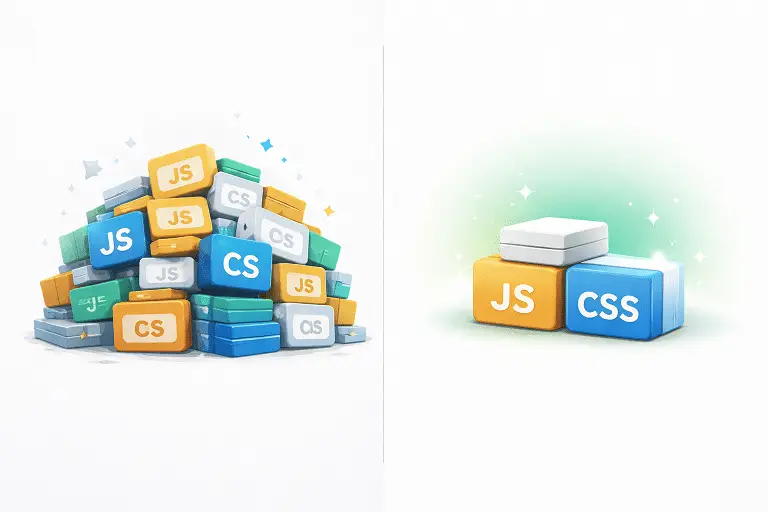
If the storage is the engine and the images are the chassis, then the code (JS and CSS) is the "cargo" that the site carries. The main problem with WordPress sites based on page builders like Elementor is "code bloat" (Code Bloat). The site loads hundreds of lines of code designed to activate widgets or designs that do not exist at all on the specific page the surfer is viewing.
How do you clean up the code without "breaking" the site?
Proper optimization requires real surgery in the website code:
- Conditional loading of assets: This is one of the most effective steps. The idea is to eliminate loading of unnecessary CSS and JS files on pages that are not needed. For example: if you don't have a contact form on the home page, there is no reason for the Contact Form 7 or Elementor Forms code to be loaded there. Each file that is deleted saves valuable time for Google's AI scanners and makes it easier on the mobile device's processor.
- Handling Render-Blocking Resources: These are the resources that "block" the rise of the site. The browser stops everything to read them before displaying content to the browser. The professional solution is to transfer non-critical files to the end of loading (Defer) or charging them at the same time (Async). This way the surfer sees the content immediately, and the design "decorations" are loaded a fraction of a second later.
- Minification: The process of removing spaces, comments, and unnecessary characters from code. Although it sounds negligible, the accumulation of thousands of lines of code becomes a significant mass that affects the processing speed.
- Disabling native Google Fonts and Emoji: WordPress loads files by default that are not always required. It is recommended to store the fonts locally on a fast server (as we do in our VPS infrastructure at uPress), which saves unnecessary requests to external servers and speeds up the LCP index considerably.
Elementor's challenge in 2026
Although Elementor has made a leap forward with the Containers mechanism, it still tends to load heavy libraries. To achieve peak performance, you must take advantage of theExperiments (experimental settings) of Elementor intelligently and enable features like Optimized DOM Output and-Improved Asset Loading - Only after a full compatibility check.
Expert tip: Do not install a "speed add-on" and activate all its options at once. This is the sure recipe for breaking the website's design. Real optimization is done in layers, while constantly checking that the site functions perfectly both on mobile and on the computer after each change.
The Strategy Behind the Score: Why PageSpeed Isn't Everything?
A common mistake of website owners is a blind pursuit of the "green number" (score 100) in Google's measurement tool. While a high score is a good indication, the real goal is The actual user experience. A site can receive a score of 95 but feel "stuck" to the surfer, and vice versa - a site with a score of 85 can feel lightning fast.

The difference between technical speed and perceived speed (Perceived Performance)
In the SEO world of 2026, we emphasize that the surfer receives an initial interaction as quickly as possible.
- Gradual loading: The goal is to display "Above the Fold" in less than a second. As soon as the surfer starts reading the title or seeing the main image, the Google bots and the AI already understand that the website provides value.
- Prevention of "stasis" (TBT): We check the Total Blocking Time. This is the time when the browser is busy processing code and does not allow the surfer to click on anything. Reducing this index is what differentiates a frustrating site from a fun site to browse.
What does a professional optimization process look like?
Instead of magic solutions, thorough work looks like this:
- Deep diagnosis: Not just running a test in PageSpeed Insights, but analyzing Waterfall reports to understand exactly which file is delaying loading.
- Infrastructure care: Alignment at the server level (as we mentioned in the storage section).
- Optimization of the page structure (DOM): Reducing the number of elements on the page. A site with thousands of HTML elements will always be slower, no matter how many memory plugins are installed on it.
- Tests on weak devices: A website that looks fast on your new iPhone 16 may crawl on a 3-year-old Android device. True optimization is measured on the weakest device.
A point to think about: When you see a site with a score of 90 or higher, it's no accident. This is the result of proper planning where the design does not come at the expense of performance, but works together with them.
Personal example: speed as a standard of excellence
At our agency, we don't just talk about performance - we implement it. To meet Google's strictest standards for 2026, we have implemented a process Improving site speed Aggressive to our agency site, with the goal of reaching the limit of technological ability.
The results speak for themselves:
PageSpeed Insights score on a computer (Desktop):
- Final score: 100 (perfect!).
- Visual load time (LCP): only 0.5 seconds (almost instantly!).
- Page Blocking Time (TBT): standing on 0ms.
PageSpeed Insights Score on Mobile:
- Final score: 98.
- Visual load time (LCP): standing on 2.1 seconds (in the green and strict range).
- Page Blocking Time (TBT): standing on 0ms.
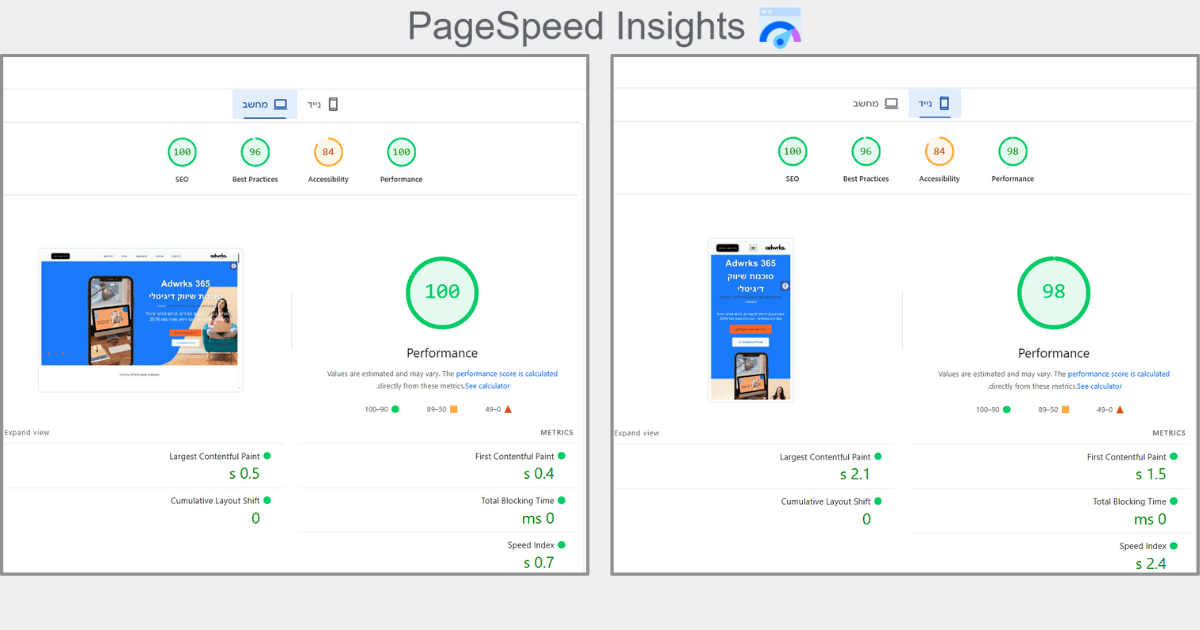
How did we do it? We have integrated advanced server infrastructures, a full transition to the WebP image format, and smart management of JavaScript resources (Delayed Loading). The result is a site that loads almost instantly, provides a smooth user experience and is ranked at the technological top of Google.
Summary: The road to a fast website in 2026 starts today
improvement Site speed It is not a "Zabang and we're done" project. It is a continuous process of maintenance, control and adaptation to the changing technologies of Google and the world of AI. As we have seen, speed affects every aspect of your digital business: from the positions in the organic search results, through the approval of the ads In Google Ads And to the profit line and the conversion of surfers to paying customers.
The combination between a strong storage infrastructure (such as a dedicated VPS server), technical optimization of code and media, and an understanding of the new user experience metrics, is the winning formula for a site that not only survives in 2026, but leads the market.
Summary checklist - what can be done now?
- Performance test: Run your site in PageSpeed Insights and look at the Mobile data (the really important ones).
- The storage exam: Check if your server supports HTTP/3 and current PHP versions.
- Weight reduction: Make sure that all the images on the site are in WebP format and that there are no heavy videos that are loaded directly from the server.
- Professional advice: Sometimes, the problem lies deep within the code or the site template, and in these cases a professional hand is required who knows how to perform the "analysis" without harming the site's activity.
Your site does not meet expectations? Don't let a slow website stop your business from growing. on-Adwrks 365, we specialize in cracking complex technical challenges and turning WordPress and Elementor websites into fast and converting performance machines.
Contact us today for a comprehensive performance check of your website and a work plan to improve PageSpeed.
Need help dealing with the future of SEO?

As you understand, world The organic promotion has become more complex than ever. we are inAdwrks 365 We live and breathe these changes. Our team of experts consists of first-class SEO professionals who know the new Google algorithms, understand the psychology of search in the age of AI and use the most advanced tools to build customized promotion strategies for each business.
We don't believe in "tricks" or shortcuts. We work in full cooperation with our clients, and our goal is not only to bring traffic to the website, but to create a strong, authoritative and profitable digital presence over time. We will know how to produce quality content for you that is suitable for both voice search and AI Overviews, we will make sure that your site meets all of Google's technical requirements, and we will build a strong link profile for you that will place you at the top of your field.
If you want to ensure that your business is not left behind in the digital age The new, it's time Contact us.
What else affects your digital presence in 2026?
Improving site speed is a critical layer, but it is part of an entire ecosystem of modern SEO. To ensure the first place in Google, we combine all fronts of technology in our work:
The core issues we lead in:
- Optimized for SGE: Adapting the website to the age of Google's Search Generative Experience.
- Performance-driven User Experience (UX): A connection between a spectacular design and a loading speed of less than 2 seconds.
- SEO based on artificial intelligence: Using advanced tools for data analysis and forecasting trends.
- Core Web Vitals Strategy: Compliance with the strictest LCP, TBT and CLS standards.
- Voice Search and Entity-Based SEO: Adapting the content to the way people are really searching in 2026.
- Website security and HTTP/3 protocols: Because speed without security is half the work.