Find out how to advertise your products on Google Shopping and use the tool to promote sales, leads and website traffic.
Online shopping - we all do it! And it is without a doubt the biggest thing in the last decade.
Online shopping has long been an integral part of our lives. If you have an online store, you surely aim to increase exposure, attract more potential customers and increase sales. One of the most effective ways to achieve this is through Google Shopping.
Sales shop owner? Want more exposure, more sales?
Promote your store and products in the most prominent position on Google
Promotion on Google Shopping is a tool duty for you!
Have you ever looked for a specific product and found yourself jumping between countless websites, comparing prices and features? The process can be exhausting. This is where services that centralize products from a variety of stores in one place come into play. While marketplace sites such as Amazon, eBay and others play an important role, Google Shopping offers a unique and central platform directly within the world's largest search engine.
Google Shopping allows potential buyers to discover, compare and buy products from a wide variety of sellers, all from the familiar Google search experience. For you, as a seller, this means tremendous exposure to a target audience that is actively looking for what you offer. Clicking on your product takes the buyer directly to your website to complete the purchase - making this platform a powerful engine for driving quality traffic and sales.
If you're not taking advantage of Google Shopping, you're probably missing out on a significant opportunity. This guide is designed to help you deeply understand the platform, its benefits and how you can start leveraging it for your business in 2025.
A shopping campaign is profitable for both buyers and sellers (advertisers) and is considered one of the most effective ways to advertise products on Google these days.
Google Shopping is:
Powerful: Google Shopping applies Google's search technology to help you find and research products from online stores around the web and then directs you directly to where you can buy them.
comprehensive: Find everything from common to unusual products.
fast: Almost immediately after entering a search, you'll see images of relevant products and links to more information, including the stores that sell them.
What is Google Shopping?
Google Shopping is a service from Google that allows consumers to search, compare and discover physical products offered for sale by retailers and sellers across the Internet. The service functions as a price comparison engine (CSE - Comparison Shopping Engine) and displays rich visual search results.
The history of the service begins in 2002 under the name "Froogle", which acted as a product index. In 2012, Google made a significant change and turned the service into a paid advertising model (Pay-Per-Click), where retailers have to pay for their products to appear in prominent positions. Today, Google Shopping is an integral part of the Google Ads advertising platform.
It is important to distinguish between two main components in Google Shopping:
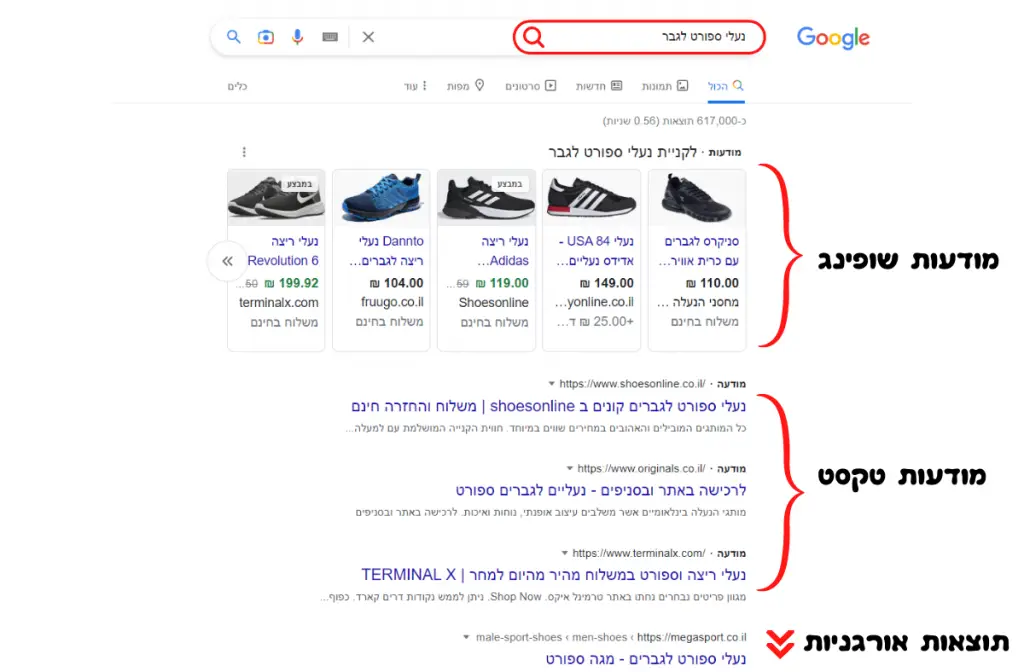
Shopping Ads: These are paid ads (PPC) that appear in prominent positions in Google's search results, in the dedicated "Shopping" tab, in Google Photos, on Google's partner sites, and sometimes also on YouTube, Discover and Gmail (mainly through Performance Max campaigns). The ads are activated and managed through the Google Ads account and are based on product data uploaded to Google Merchant Center.
Free product cards (Free Listings): Google also allows an organic (free) display of products, mainly in the "Shopping" tab, but sometimes also in the main search results and in Google Images. To appear for free, a Google Merchant Center account and a valid product feed are still required, but there is no cost for clicks.
Unlike regular Google text ads that are based on targeting keywords that the advertiser chooses, Shopping ads (and the free tickets) rely on Product Feed. This feed contains detailed information about each product you sell (name, description, price, image, brand, availability, etc.). Google scans the feed and uses this information to automatically match the relevant products to the users' search queries.
Why should you use shopping ads on Google?
Most online shopping trips start with a Google search. A strong Google Shopping presence is critical to reaching potential customers at the exact moment they are looking for the products you offer. Here are some key reasons why this is a must-have tool:
- Outstanding visual visibility: Shopping ads often appear at the top of the search results, above the text ads and organic results, or in a prominent position next to them. The visual format (image, price, familiar name) catches the eye and provides critical information at a glance, leading to higher click-through rates (CTR) compared to text ads for product queries.
Quality and targeted traffic: A user who clicks on a shopping ad has already seen the image of the product, its price and the name of the seller. Therefore, these clicks tend to be of higher quality, with a higher probability of leading to a purchase, because the user arrives at the product page with clear expectations.
Wider exposure: Your products can appear in a variety of locations on the Google Network (search, shopping, images, YouTube, partners, etc.), and in addition, multiple of your shopping ads or your shopping ad and text ad can appear together for the same search query, increasing your "real estate" on the results page.
Competitive advantage: If your competitors are using Google Shopping and you are not, you are losing significant market share. Presence on the platform allows you to compete directly and present your advantages (price, promotions, availability).
Data-based management and measurement: Google Ads provides detailed tools for tracking the performance of shopping ads, including impressions, clicks, costs, conversions and return on advertising spend (ROAS). This data enables constant optimization of the campaigns.
Free exposure: In addition to paid ads, the option to appear in free product cards provides an opportunity for additional exposure and traffic without direct advertising cost.
How do shopping ads look and where are they displayed?
As mentioned, shopping ads are visual in nature and usually contain:
Image of the product: The most prominent ingredient.
Product Name (Title): A brief description of the product.
price: Current product price.
Name of the seller/store: Your brand or store name.
Sometimes: Star ratings (from product reviews), special offers (like "free shipping" or "discount"), or local availability.
Main performance locations:
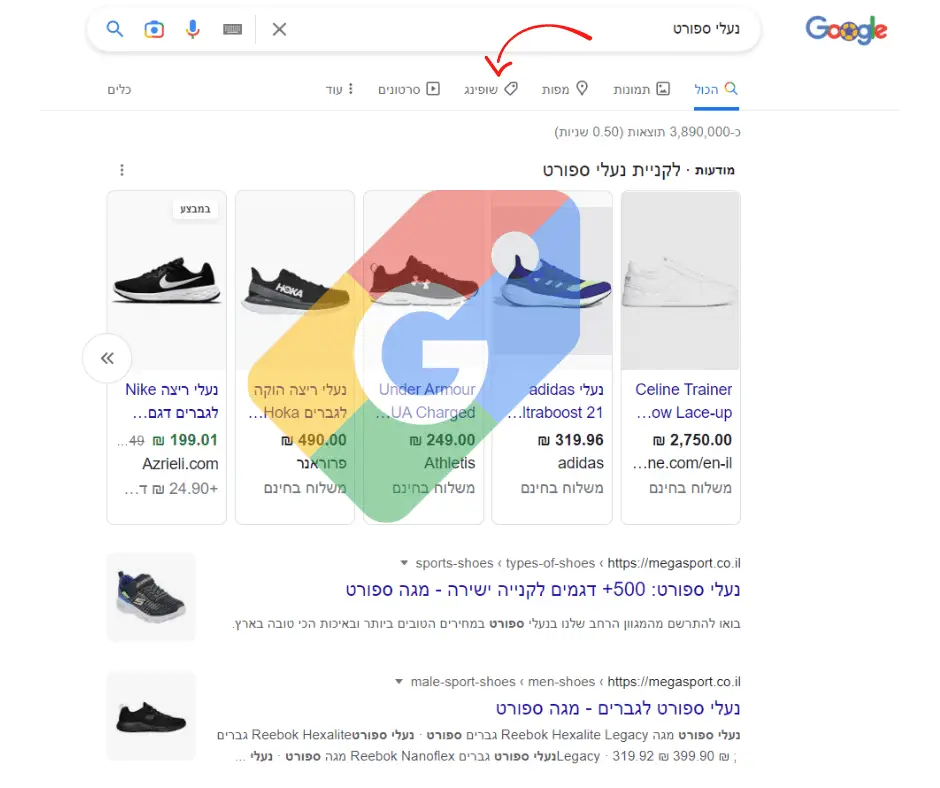
Google's main search results page (google.com): Usually appear as a carousel of images at the top of the page, or in a separate column (usually on the right side on desktop computers). Can appear alongside text ads and organic results.
"Shopping" tab (Shopping Tab): A dedicated tab within the Google search engine, which only displays product results (ads and free tickets) and allows for more advanced filtering and comparison.
Google Images (Google Images): Relevant shopping ads can appear when users search for images related to products.
Partner sites in the Google search network: If you selected this option in the campaign settings, ads can also appear on other sites that use the Google search engine.
YouTube, Discover, Gmail: Mainly through automated smart campaigns like Performance Max, Google can present your products on these platforms to relevant audiences.
It's important to note that both paid ads and free tickets can appear at the same time, with the paid ads usually getting more prominent placements.
How does Google Shopping work? The mechanism behind the scenes
To understand how to succeed in Google Shopping, it is important to know the two main technological components that drive it:
Google Merchant Center (GMC): This is your central "control panel" for everything related to your product data on Google. Here you upload and manage your store and product information, set shipping and tax information, and monitor data integrity. A GMC account is a necessary condition for activating shopping ads and appearing in free tickets.
Product data feed (Product Feed): This is a file (usually in XML, TXT format or through Google Sheets or API) that contains a detailed list of all the products you want to advertise on Google. Each line in the file represents a product, and each column represents an "Attribute" of the product. Google uses the information in the feed to create the shopping ads and match them to the search queries.
Essential product features in the feed
In order for your products to be approved and displayed properly, the feed must include several mandatory properties, and it is highly recommended to also include as many optional properties as possible to improve performance. Key features include:
ID: A unique identifier for each product.
Title: The name of the product to be displayed in the ad (critical for optimization).
Description: A more detailed description of the product (used by Google to match queries).
Link: URL of the product page on your website.
Link to the image (Image Link): URL of the main product image (quality image required).
Price: The current and accurate product price.
Availability: Stock status (in stock, out of stock, pre-order).
Brand: The brand name of the product.
GTIN (Global Trade Item Number): Global Commercial Item Number (such as EAN, UPC, ISBN). Mandatory for most new products from well-known brands.
MPN (Manufacturer Part Number): Manufacturer's catalog number (important if there is no GTIN).
Google Product Category: Product classification according to Google's taxonomy (improves relevance).
Product Type: Classification of the product according to the categories on your website (helps to organize campaigns).
Matching process: After uploading the feed to GMC and linking the account to Google Ads, Google scans the product data. When a user performs a relevant search, Google's algorithms compare the search terms to the information in the feed (mainly titles, descriptions, categories, brand, etc.) and decide which products to display in the shopping ads. The ad auction takes into account your bid and the quality of the ad and landing page (quality score) to determine ad placement.
How to set up the Google Shopping campaign
The process for activating shopping ads includes several main steps:
Opening and setting up a Google Merchant Center account:
Go to the Google Merchant Center website and sign up with your Google Account.
Fill in your business details (name, address, phone).
Verify your URL (using HTML code, Google Analytics, Tag Manager or Google Domains).
Set the shipping details (costs, regions, delivery times).
Set the tax details (if applicable).
Creating and uploading the product feed:
Choose a method to create the feed:
manually: Creating a file (for example, in Google Sheets) and uploading it. Suitable for a small number of products.
Plugins/Apps: Popular eCommerce platforms (Shopify, WooCommerce, Magento, etc.) offer dedicated plugins or apps to automatically create and sync the feed with GMC. This is the recommended method for most stores.
Scheduled Fetch: Google can "pull" the feed regularly from a URL where it is updated.
Content API: An advanced solution for developers that allows product data to be updated in real time.
Make sure the feed meets Google's requirements: Include all mandatory features and as many recommended features as possible. Make sure the data is accurate and up-to-date (especially price and availability).
Upload the feed to GMC and follow the approval of the products: After uploading, Google will check the feed. You can see the status of the products (approved, rejected, pending) in the "Diagnostics" tab in GMC. It is important to correct errors as soon as possible.
Linking a Google Merchant Center account to a Google Ads account:
Within the GMC account, navigate to Settings -> Linked Accounts.
Select Google Ads and enter the Customer ID of your Google Ads account.
Confirm the request within your Google Ads account.
Creating a shopping campaign in Google Ads:
In your Google Ads account, click "+" to create a new campaign.
Select a goal for the campaign (eg, "Sales").
Choose a campaign type:
Shopping (Standard Shopping): Gives you more manual control over bids, product groups and negative keywords. Recommended for beginners or those who want individual control.
Maximum performance (Performance Max - PMax): Automated goal-based campaign that uses machine learning to show your products (and other ads) across all Google networks (including Shopping, Search, Display, YouTube, Discover, Gmail). Google is pushing hard towards PMax, and it can be very effective, but requires trust in automation and provides less direct manual control. As of 2025, PMax is the dominant type and recommended by Google for many advertisers.
Select the linked Merchant Center account and the country where the products are sold.
Define the bidding strategy (Bidding Strategy - for example, maximizing clicks, target return on advertising expenses - Target ROAS) and the daily budget.
Set additional targeting (specific geographic locations, if required).
Organize the products in ad groups (Ad Groups) or asset groups (Asset Groups in PMax) by category, brand, or any other logic that will allow effective management and optimization.
Save and run the campaign.
Optimizing Google Shopping campaigns for maximum success in 2025
Setting up the campaign is just the beginning. Getting the most out of your Google Shopping investment requires constant optimization. Here are some of the key areas to focus on:
Optimization of the product feed (Feed Optimization): This is the most important factor for success! A quality and accurate feed is the basis for everything.
Titles: Include relevant keywords that customers might search for in the product title (eg, "Adidas Ultraboost Men's Running Shoes Size 43 Black"). Organize the important information first.
Descriptions: Write detailed descriptions rich in relevant keywords.
Images: Use high-quality, clear images on a white background (usually) that best showcase the product. Consider adding additional images (additional_image_link).
Google Product Category: Choose the most accurate category from Google's taxonomy.
Unique identifiers (GTIN/MPN): Make sure they are accurate and correct. This is essential for proper matching and features like price comparison.
Price and availability: Always keep this data up to date to avoid product rejection or poor user experience.
Additional features: Fill in as many relevant characteristics as possible (color, size, material, gender, etc.) to enable better filtering and increase relevance.
Structured data (Structured Data): Implement a product schema (Schema.org Product markup) on the product pages of your website to allow Google to verify the feed data (especially price and availability) and enable automatic updates.
Campaign Structure:
Standard campaigns: Split campaigns by product categories, brands, profit margins or historical performance to enable differential budget allocation and bidding. Use Product Groups to divide inventory within a campaign and set different bids.
Performance Max: Provide Google with as many quality "signals" as possible - relevant audiences (customer data, interests), asset groups targeted by product categories, and a well-organized product feed.
Bidding Strategies:
Experiment with different strategies. Start with "Maximize Clicks" to collect data, then move on to conversion-based strategies like "Target ROAS" or "Maximize Conversion Value" once you have enough conversion data.
Use bid adjustments in standard campaigns for devices, locations, times of day and audiences to focus budget on the most profitable locations. In PMax, the automation takes care of this, but it is important to provide the correct data (accurate conversion values).
Negative Keywords: (mainly relevant for standard campaigns)
Regularly go through the Search Terms Report and identify irrelevant queries that triggered your ads. Add them as negative keywords to avoid wasting budget on low-quality clicks. You can also add negative lists at the account level. (In PMax, control is more limited, but you can request conditional exclusions from Google Support or use brand safety settings).
Utilization of plugins and promotions:
Promotions: Use the Merchant Promotions program in GMC to display special discounts or offers (like "10% off", "free shipping") directly in your shopping ads. This can significantly increase the CTR.
Product Ratings: If you have reviews of your products (via approved third-party services), allow them to be featured as stars in ads. This builds trust and increases CTR.
Seller Ratings: Your overall store rating (based on reviews collected by Google and its partners) can also appear and reinforce credibility.
Performance monitoring and analysis:
Closely track key metrics (KPIs) in Google Ads: impressions, clicks, CTR, cost per click (CPC), conversion rate (CPA), conversion value (Conversion Value), and return on advertising spend (ROAS).
Use the various reports: search term report, location report, device report, product report (Product report - shows performance at the individual product level).
Regularly check the "Diagnostics" tab in the GMC to identify and fix feed problems or policy violations.
Don't forget the free product cards!
Even if you have a limited advertising budget or you are just starting out, it is very important to enable the option of free product cards (Free Listings) in Google Merchant Center. It requires the same feed used for paid ads.
The advantages:
Additional exposure at no cost: Your products can appear in the "Shopping" tab, in Google Photos, in Google Lens and in the main search (in some modules) without you paying for clicks.
Organic traffic to the site: Another way to attract potential buyers to your website.
Complementary to paid ads: Can appear alongside or in place of your ads, increasing your overall chance of landing a customer.
To enable this, make sure that in your GMC account, under "Growth" -> "Manage Programs", the "Free product listings" program is enabled.
Trends and innovations in Google Shopping for 2025 and beyond
The world of digital advertising is dynamic, and Google Shopping continues to evolve. Here are some trends to watch out for:
Dominance of automation and AI: Performance Max campaigns are the prominent example. Google is investing heavily in machine learning to automatically optimize bids, targeting and ad creation. This means that the quality of the data you provide (in the feed, in the audiences) becomes even more critical to the success of the campaigns.
A richer visual experience: Google is constantly exploring new and more interactive formats for displaying products, including increased use of video and "lifestyle" images.
Omnichannel shopping: A stronger connection between the online experience and the physical experience. Local Inventory Ads allow buyers to see which products are available in a store near them, with the option of self-collection (Click & Collect).
Sustainability and transparency: Google allows advertisers to highlight sustainability features of products in the feed, such as recycled materials or environmental certifications. Consumers are increasingly looking for responsible brands.
Focus on first-party data: With increasing restrictions on third-party cookies, collecting and properly using your customer data (via customer lists, for example) becomes essential for effective targeting and optimization.
Summary: Why Google Shopping is still the king of eCommerce in 2025
Google Shopping is no longer just a "nice option" - it is an essential component in the marketing strategy of any eCommerce business that wants to grow and succeed. The ability to visually present your products to a huge audience that is actively searching, at exactly the right moment, is immensely powerful.
Whether through paid ads that yield a high return on investment, or through free exposure in the product cards, a strong presence on Google Shopping increases visibility, attracts quality traffic, and above all - increases sales.
The investment in creating a high-quality and detailed product feed, in understanding the mechanisms of GMC and Google Ads, and in constant optimization of the campaigns, will pay off and place your business in an excellent position for success in the competitive market of 2025.
Sell on Google Shopping with Adwrks 365
Just sell more!
We will manage your Google Shopping campaigns professionally and meticulously, as if they were your most important digital storefront. We will make sure that your products are presented in the most attractive way, with the most accurate and up-to-date information, to maximize sales potential.
With us you can be relaxed and free to focus on business growth, inventory management and customer service - while we take care of marketing your products in the right place and at the right time.
We will make sure to place your products in the most prominent positions in the Google Shopping search results. This is how you will gain a significant advantage over your competitors, attract more quality traffic to your sales site and increase your sales turnover.
So what do we offer as part of the Google Shopping campaign management service?
Setting up and professionally setting up a Google Merchant Center account and maintaining it.
Creation, uploading and ongoing optimization of the product feed (Product Feed) - the heart of the campaign.
Full connection and synchronization between Merchant Center and Google Ads account.
Building winning campaigns in Google Shopping (either Standard Shopping or Performance Max).
Smart management of bidding strategies (Bidding) to maximize return on investment (ROAS).
Constant optimization of the campaigns based on in-depth data analysis and performance reports.
Managing negative keywords and locating relevant audiences (depending on the type of campaign).
Activation and leveraging of free product cards (Free Listings) to increase exposure.
Implementation of promotions and visibility improvements such as product ratings.
Continuous monitoring of feed integrity, product approvals and problem solving with Google.
Transparent and clear reports showing the results and progress.
Entitlement to a NIS 1500 gift voucher for your initial Google Ads advertising budget!
And by the way, our service is without obligation! We believe that a satisfied customer who earns more - does not leave 🙂
Read what customers say about us and let's start kicking your sales forward.
Ready to sell more online? Contact us today!